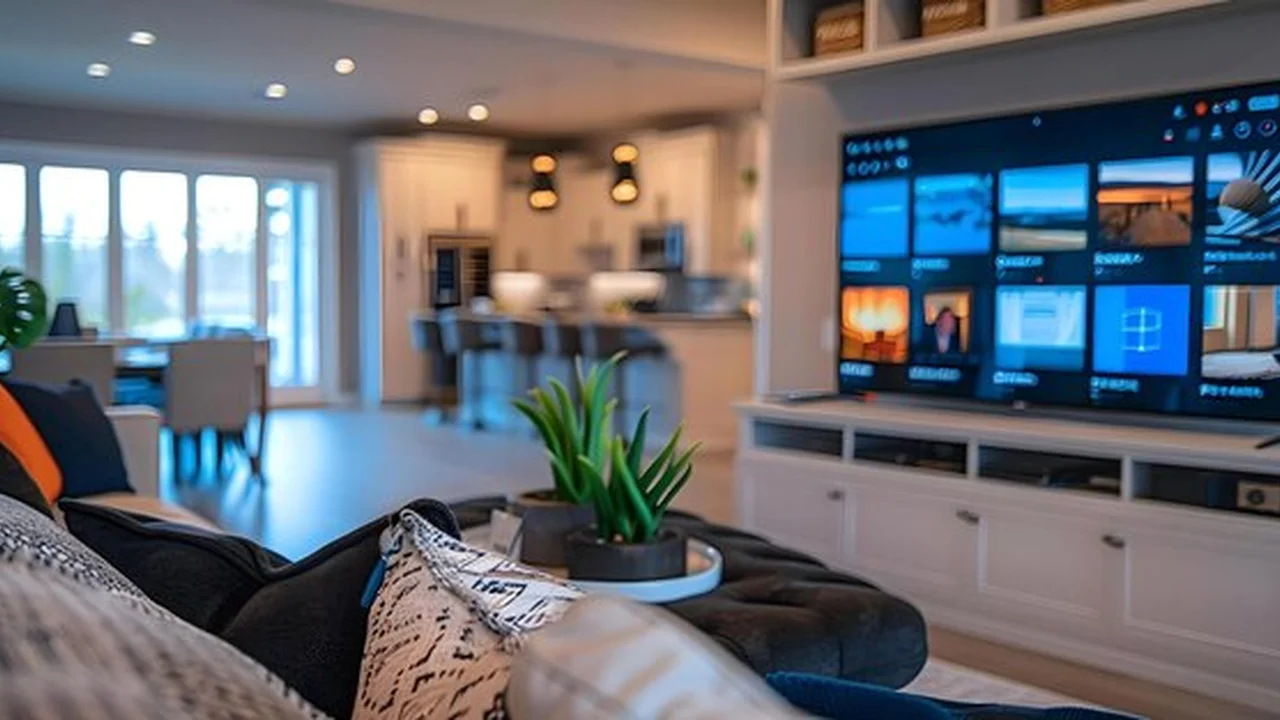
Upgrade your home entertainment. Learn how to choose the best smart TV with features that suit your viewing habits.
Choosing the Right Smart TV for Your Living Room
So, you're thinking about upgrading your old television to a shiny new smart TV? That's a fantastic idea! Smart TVs have become the centerpiece of modern living rooms, offering a world of entertainment beyond just traditional cable. But with so many brands, features, and price points out there, picking the 'right' one can feel a bit like trying to navigate a maze blindfolded. Don't sweat it, though! This guide is designed to cut through the jargon and help you make an informed decision, even if you're not a tech wizard. We'll break down everything you need to know, from screen size to operating systems, and even recommend some top picks for different budgets and needs.
Understanding Smart TV Basics What Makes a TV 'Smart'?
First things first, what exactly makes a TV 'smart'? Essentially, a smart TV is a television set with integrated internet connectivity and an operating system, much like your smartphone or computer. This allows it to do a whole lot more than just display broadcast channels. Think of it as a giant tablet for your living room. Here's what that means for you:
- Streaming Apps: Access popular services like Netflix, Hulu, Disney+, YouTube, Amazon Prime Video, and countless others directly from your TV, without needing extra devices.
- Web Browsing: Some smart TVs allow you to browse the internet, though it's often not as smooth as on a computer or phone.
- App Stores: Download new apps, games, and utilities just like you would on a smartphone.
- Voice Control: Many smart TVs come with built-in voice assistants (like Google Assistant or Amazon Alexa) or are compatible with them, letting you control your TV and even other smart home devices with just your voice.
- Screen Mirroring/Casting: Easily display content from your smartphone, tablet, or computer directly onto your TV screen.
- Smart Home Integration: Some smart TVs can act as a hub for your smart home devices, allowing you to control lights, thermostats, and more from your TV remote or voice commands.
In short, a smart TV transforms your viewing experience from passive watching to interactive entertainment. It's about convenience, choice, and a more connected home.
Screen Size and Viewing Distance Finding Your Perfect Fit
One of the first things people consider is screen size, and for good reason! A bigger screen can be more immersive, but too big for your space can be overwhelming. It's not just about how big you want, but how big your room can comfortably handle. Here's a simple rule of thumb for finding the ideal screen size based on your viewing distance:
- For 4K TVs: Multiply your viewing distance (in inches) by 0.5. So, if you sit 8 feet (96 inches) away, a 48-inch TV (96 x 0.5 = 48) would be a good starting point. You can go a bit larger or smaller based on personal preference, but this gives you a solid baseline.
- For 1080p (Full HD) TVs: Multiply your viewing distance (in inches) by 0.625.
Remember, these are guidelines. Consider the room's layout, where the TV will be placed, and how much wall space you have. Don't just go for the biggest one you can afford; ensure it fits harmoniously into your living room.
Display Technology LED LCD OLED and QLED Explained
This is where things can get a little technical, but I'll keep it simple. The display technology is crucial because it directly impacts picture quality, colors, contrast, and brightness. Here are the main types you'll encounter:
LED LCD TVs The Most Common Choice
Most TVs on the market today are LED LCDs. They use an LCD (Liquid Crystal Display) panel to create the image, and LEDs (Light Emitting Diodes) to backlight that panel. There are a few variations:
- Edge-Lit LED: LEDs are placed around the edges of the screen. This allows for thinner TVs but can sometimes lead to less uniform backlighting.
- Full-Array LED: LEDs are placed directly behind the entire screen. This offers better control over local dimming (dimming specific areas of the screen to improve contrast), resulting in better black levels and overall picture quality.
- Mini-LED: An advancement of Full-Array, Mini-LEDs use thousands of tiny LEDs, allowing for even more precise local dimming zones and incredible brightness.
Pros: Generally more affordable, very bright (great for well-lit rooms), wide range of sizes available. Cons: Black levels and contrast aren't as deep as OLED, viewing angles can sometimes be limited.
QLED TVs Samsung's Quantum Dot Technology
QLED (Quantum Dot LED) is essentially an enhanced LED LCD TV, primarily championed by Samsung. It uses a layer of quantum dots between the LED backlight and the LCD panel. These tiny nanocrystals emit different colors when light hits them, allowing for a wider color gamut and increased brightness compared to standard LED LCDs.
Pros: Extremely bright (excellent for HDR content and bright rooms), vibrant and accurate colors, long lifespan, no risk of burn-in. Cons: Still relies on a backlight, so black levels aren't as perfect as OLED, viewing angles can still be an issue on some models.
OLED TVs The Premium Picture Quality
OLED (Organic Light Emitting Diode) TVs are considered by many to offer the best picture quality, especially for movie lovers. Unlike LED LCDs, OLED pixels are self-illuminating, meaning each individual pixel can turn on or off independently. This allows for:
- Perfect Blacks: When a pixel is off, it's truly black, leading to infinite contrast.
- Incredible Contrast: The difference between the brightest whites and darkest blacks is stunning.
- Wide Viewing Angles: Colors and contrast remain consistent even when viewed from the side.
- Fast Response Times: Great for gaming as there's virtually no motion blur.
Pros: Unmatched black levels and contrast, stunning colors, wide viewing angles, thin designs. Cons: Generally more expensive, not as bright as QLED (can be an issue in very bright rooms), potential (though rare with normal use) for screen burn-in with static images over long periods.
Resolution 4K 8K and Beyond
Resolution refers to the number of pixels on the screen, which determines the sharpness and detail of the image. More pixels mean a clearer, more detailed picture.
- 4K (Ultra HD): This is the current standard and what most people should aim for. A 4K TV has 3840 x 2160 pixels, which is four times the resolution of Full HD (1080p). There's a vast amount of 4K content available now, from streaming services to Blu-ray discs.
- 8K: With 7680 x 4320 pixels, 8K TVs offer even more detail. However, native 8K content is still very scarce, and the human eye can often barely distinguish the difference from 4K unless you're sitting very close to a very large screen. For most people, 8K is an unnecessary expense right now.
For the vast majority of users, a 4K TV is the sweet spot, offering excellent picture quality without breaking the bank or being ahead of the available content.
HDR High Dynamic Range for Better Colors and Contrast
HDR (High Dynamic Range) is arguably more important than resolution for a truly stunning picture. It's not about more pixels, but better pixels. HDR expands the range of colors and contrast a TV can display, making bright areas brighter and dark areas darker, with more detail in both. This results in a more lifelike and immersive image.
There are several HDR formats:
- HDR10: The open-source, most common HDR format. All HDR-compatible TVs support HDR10.
- Dolby Vision: A premium, proprietary HDR format that uses dynamic metadata, meaning it can optimize the picture scene-by-scene or even frame-by-frame. Generally considered superior to standard HDR10.
- HDR10+: Samsung's answer to Dolby Vision, also using dynamic metadata.
- HLG (Hybrid Log-Gamma): Primarily used for broadcast TV.
If you want the best picture, look for a TV that supports at least HDR10 and ideally Dolby Vision. Many premium TVs support both.
Refresh Rate Smooth Motion for Sports and Gaming
The refresh rate, measured in Hertz (Hz), indicates how many times per second the screen refreshes its image. A higher refresh rate means smoother motion, which is particularly important for fast-paced content like sports and video games.
- 60Hz: The standard refresh rate. Perfectly fine for most TV shows and movies.
- 120Hz: Offers noticeably smoother motion, reducing blur and judder. This is highly recommended for gamers (especially those with next-gen consoles like PS5 or Xbox Series X) and sports enthusiasts.
Be wary of marketing terms like 'Motion Rate 240' or 'TruMotion 120'. These often refer to motion processing technologies that simulate a higher refresh rate, rather than a true native 120Hz panel. Always look for the native refresh rate.
Smart TV Platforms Operating Systems and User Experience
Just like your phone has iOS or Android, smart TVs have operating systems (OS) that dictate their interface, app availability, and overall user experience. The OS is a big deal because it's how you'll interact with your TV every day. Here are the most popular ones:
LG webOS Intuitive and User-Friendly
LG's webOS is known for its clean, intuitive interface and the 'Magic Remote' which acts like a mouse pointer. It's very easy to navigate and customize. App selection is excellent.
Samsung Tizen OS Fast and Feature-Rich
Samsung's Tizen OS is another popular choice, offering a fast, responsive interface with a wide array of apps and smart features. It integrates well with Samsung's ecosystem.
Google TV Android TV Smart and Connected
Google TV (the newer version of Android TV) is found on Sony, TCL, Hisense, and other brands. It offers deep integration with Google services, excellent voice control via Google Assistant, and a massive app library from the Google Play Store. It's great if you're already invested in the Google ecosystem.
Roku TV Simple and Straightforward
Roku TV is known for its extreme simplicity and ease of use. It has a vast selection of streaming channels and a very straightforward interface. It's often found on more budget-friendly TVs like TCL and Hisense.
Amazon Fire TV OS Alexa Integration
Similar to Roku, Amazon Fire TV OS is simple and heavily integrated with Amazon's ecosystem, including Alexa voice control and Amazon Prime Video. It's found on Amazon's own Fire TV Omni and 4-Series, as well as some Insignia and Toshiba models.
The best platform for you depends on your personal preference for interface and your existing smart home ecosystem. Try to test them out in a store if possible.
Connectivity Ports and Inputs You Need
Don't overlook the ports! You'll need enough inputs to connect all your devices, like gaming consoles, soundbars, Blu-ray players, and streaming sticks (if you still use them). Look for:
- HDMI Ports: At least 3, but 4 is better. Ensure they are HDMI 2.1 if you're a serious gamer with a next-gen console, as this supports 4K at 120Hz and other advanced gaming features.
- USB Ports: Useful for connecting external hard drives for media playback or powering streaming sticks.
- Optical Digital Audio Out: For connecting older soundbars or audio receivers.
- Ethernet Port: For a stable wired internet connection, which is often more reliable than Wi-Fi for streaming high-bandwidth content.
- Wi-Fi and Bluetooth: Essential for smart TV functions and connecting wireless accessories.
Audio Quality Do You Need a Soundbar?
Let's be honest: TV speakers are rarely great. While smart TVs offer amazing visuals, their thin designs often mean compromised audio. For a truly immersive experience, especially for movies and music, a separate sound system is highly recommended. This could be:
- Soundbar: The most popular choice for improving TV audio. Easy to set up and significantly better than built-in speakers.
- Home Theater System: For audiophiles, a full surround sound system offers the ultimate audio experience.
Factor in the cost of a soundbar or audio system when budgeting for your new TV, as it will dramatically enhance your overall entertainment.
Budgeting for Your Smart TV What to Expect
Smart TVs come in a huge range of prices. Here's a general idea of what you can expect:
- Entry-Level (Under $500): You'll find smaller 4K LED LCD TVs (32-55 inches) with basic smart features (Roku TV, Fire TV). Good for secondary rooms or those on a tight budget.
- Mid-Range ($500 - $1500): This is the sweet spot for many. You'll get larger 4K LED LCDs (55-75 inches) with better picture processing, full-array local dimming, and more advanced smart platforms (Tizen, webOS, Google TV). Some smaller QLEDs might also fall into this range.
- Premium ($1500+): Here you'll find larger QLEDs, Mini-LEDs, and OLED TVs (55 inches and up) with top-tier picture quality, advanced gaming features (HDMI 2.1, 120Hz), and premium designs.
Prices fluctuate, especially around sales events like Black Friday or Prime Day, so keep an eye out for deals!
Top Smart TV Recommendations for Different Needs and Budgets
Alright, let's get to some specific recommendations. Remember, these are general suggestions, and models change frequently, but these brands consistently deliver quality.
Best Overall Picture Quality (Premium Pick)
LG C3 OLED TV
- Why it's great: The LG C3 (and its predecessors like the C2) is consistently rated as one of the best TVs money can buy. Its OLED panel delivers perfect blacks, infinite contrast, stunning colors, and wide viewing angles. It's fantastic for movies, TV shows, and gaming thanks to its 120Hz refresh rate and multiple HDMI 2.1 ports. LG's webOS is also very user-friendly.
- Ideal for: Movie buffs, serious gamers, anyone who wants the absolute best picture quality and has a darker viewing environment.
- Typical Price Range: $1,500 - $3,000+ depending on size (55-83 inches).
- Considerations: Can be expensive. While burn-in is rare with normal use, it's a theoretical concern for those who leave static images on screen for extremely long periods.
Best for Bright Rooms and Vibrant Colors (Premium Pick)
Samsung QN90C Neo QLED TV
- Why it's great: If you have a very bright living room and want incredible brightness and vibrant colors without the OLED price tag (or burn-in concern), the Samsung QN90C (or similar Neo QLED models) is a fantastic choice. It uses Mini-LED backlighting for excellent contrast and brightness, making HDR content pop. Samsung's Tizen OS is fast and feature-rich.
- Ideal for: Viewers in bright rooms, sports fans, gamers, those who prioritize extreme brightness and color volume.
- Typical Price Range: $1,300 - $4,000+ depending on size (55-85 inches).
- Considerations: While blacks are very good for an LED TV, they won't be as perfect as OLED.
Best Mid-Range Value (Excellent All-Rounder)
Sony X90L Series (Full Array LED)
- Why it's great: Sony's X90L offers a fantastic balance of picture quality, features, and price. It's a full-array LED TV with excellent local dimming, providing deep blacks and bright highlights. Sony's picture processing is top-notch, and it runs on Google TV, offering a smooth smart experience with great app support and Google Assistant. It also has 120Hz refresh rate and HDMI 2.1 for gaming.
- Ideal for: Most people looking for a great all-around TV that excels with movies, sports, and gaming without breaking the bank.
- Typical Price Range: $900 - $2,000+ depending on size (55-85 inches).
- Considerations: Not as bright as premium QLEDs, and blacks aren't OLED-level, but still very impressive for its price point.
Best Budget-Friendly Smart TV
TCL Q7 QLED TV
- Why it's great: TCL has become a leader in offering incredible value. The Q7 QLED series provides QLED color and brightness, full-array local dimming, and a 120Hz refresh rate (even 240Hz VRR for gamers) at a price point that's hard to beat. It runs on Google TV, giving you access to a huge app library.
- Ideal for: Budget-conscious buyers who still want a large screen, good picture quality, and gaming features. Great for a secondary TV or a first smart TV.
- Typical Price Range: $600 - $1,500 depending on size (55-85 inches).
- Considerations: Picture processing isn't as refined as Sony or Samsung, and viewing angles might not be as wide.
Best for Simplicity and Ease of Use
Hisense U6 Series (UHD ULED Roku TV)
- Why it's great: Hisense offers solid picture quality for the price, and when paired with Roku TV, it becomes incredibly easy to use. The U6 series often features ULED technology (Hisense's version of enhanced LED LCD with local dimming) and decent brightness. Roku's interface is straightforward, and the remote is simple.
- Ideal for: Anyone who prioritizes ease of use, a simple interface, and a good picture without a lot of fuss, especially those new to smart TVs.
- Typical Price Range: $400 - $1,000 depending on size (50-75 inches).
- Considerations: Picture quality won't match premium models, and advanced gaming features might be limited.
Installation and Setup Tips for Your New Smart TV
Once you've picked your perfect smart TV, getting it set up is usually quite straightforward. Here are a few tips:
- Unboxing: Most large TVs require two people to safely lift them out of the box and onto a stand or wall mount.
- Stand vs. Wall Mount: Decide if you're using the included stand or wall-mounting it. Wall mounting can save space and look cleaner, but often requires professional installation or careful DIY.
- Cable Management: Plan how you'll hide or organize your cables for a tidy look. Cable ties, sleeves, or in-wall solutions can help.
- Initial Setup: Follow the on-screen prompts. You'll connect to Wi-Fi, sign into your smart TV platform (Google, Samsung, LG, Roku, etc.), and download your favorite streaming apps.
- Picture Settings: Don't just stick with the default! Explore the picture settings. Often, 'Cinema' or 'Movie' modes offer the most accurate colors. Turn off 'motion smoothing' (sometimes called 'Soap Opera Effect') for films and TV shows, as it can make content look unnatural.
- Software Updates: Ensure your TV's software is up to date. Manufacturers frequently release updates that improve performance, add features, and fix bugs.
Future-Proofing Your Smart TV Investment
While technology moves fast, you can make choices that will keep your TV relevant for longer:
- 4K Resolution: This is a must-have.
- HDR Support (especially Dolby Vision): Crucial for the best picture quality.
- HDMI 2.1: If you're a gamer or plan to be, this is important for next-gen consoles.
- Reputable Brand: Stick with well-known brands that have a track record of good software support and updates.
A smart TV is a significant investment, but with the right research, you can find one that brings years of entertainment and enhances your living room experience. Happy viewing!
:max_bytes(150000):strip_icc()/277019-baked-pork-chops-with-cream-of-mushroom-soup-DDMFS-beauty-4x3-BG-7505-5762b731cf30447d9cbbbbbf387beafa.jpg)