Comparing Mobile Hotspots for On-the-Go Internet
In today's hyper-connected world, losing internet access can feel like being stranded on a desert island. Whether you're a digital nomad, a frequent traveler, or just someone who needs reliable internet beyond the confines of your home Wi-Fi, a mobile hotspot can be your digital lifeline. But with so many options out there, how do you pick the right one? This guide will walk you through everything you need to know about mobile hotspots, comparing the best devices, their features, use cases, and even pricing, all in plain English.
What is a Mobile Hotspot and Why Do You Need One?
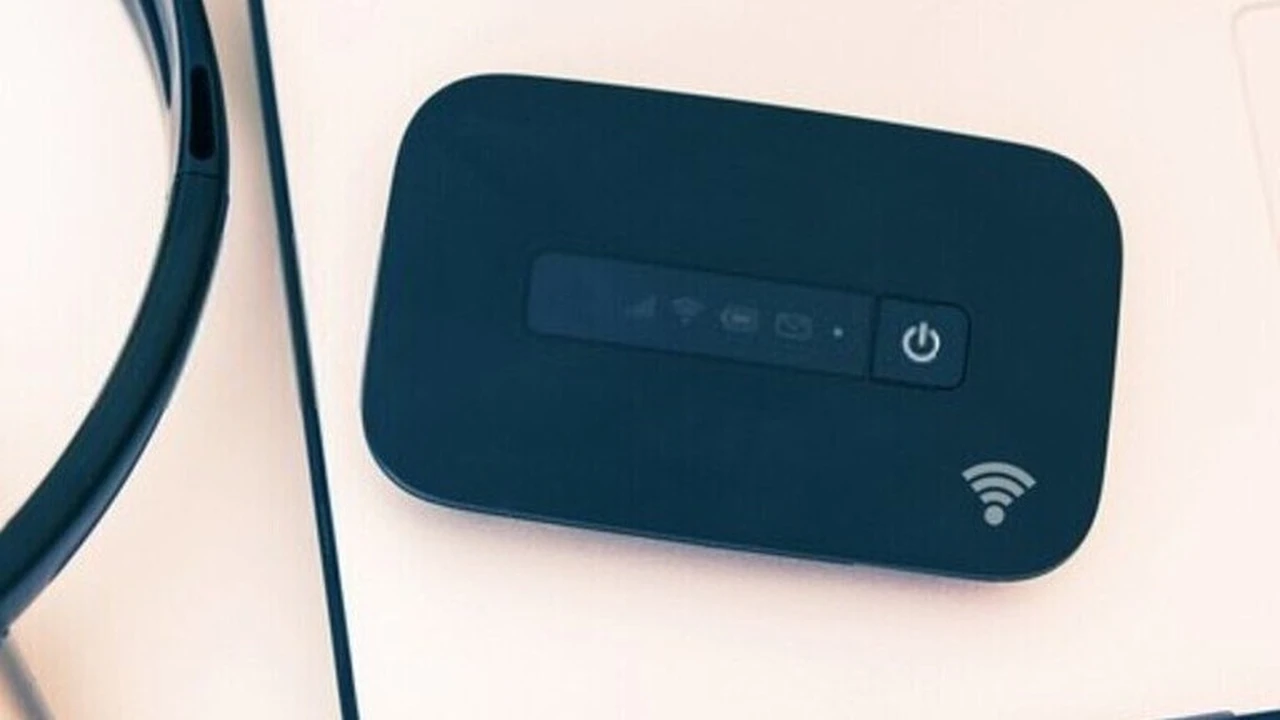
Let's start with the basics. A mobile hotspot, often called a portable Wi-Fi device or MiFi, is essentially a small, portable router that uses cellular data to create a Wi-Fi network. Think of it as your smartphone's hotspot feature, but dedicated, often more powerful, and with better battery life. It allows multiple devices – your laptop, tablet, other smartphones, or even smartwatches – to connect to the internet simultaneously, just like they would to your home Wi-Fi.
Why might you need one? Imagine these scenarios:
- Travelers: You're on a road trip, and your hotel Wi-Fi is spotty, or you're in a remote area with no public Wi-Fi. A mobile hotspot keeps you connected for navigation, entertainment, and work.
- Remote Workers: Working from a coffee shop or a co-working space can be great, but public Wi-Fi can be insecure and slow. A personal hotspot offers a secure and often faster connection.
- Students: For group projects or studying on the go, a reliable internet connection is crucial, especially if campus Wi-Fi is overloaded.
- Families: Keep the kids entertained on long car rides with their tablets connected, or ensure everyone has internet access during a camping trip.
- Backup Internet: If your home internet goes down, a mobile hotspot can be a lifesaver for essential tasks.
Key Features to Consider When Choosing a Mobile Hotspot Device
Not all hotspots are created equal. When you're shopping around, keep these crucial features in mind:
Battery Life and Portability for Extended Use
Since the whole point of a mobile hotspot is portability, battery life is paramount. You don't want your internet dying in the middle of an important video call or while navigating a new city. Look for devices that offer at least 8-10 hours of active use, with some premium models boasting 15-24 hours. Also, consider the physical size and weight. Most are pocket-sized, but some are more compact than others.
Network Compatibility and Speed for Optimal Performance
This is where things get a bit technical, but it's super important. Mobile hotspots rely on cellular networks (4G LTE, 5G). Ensure the device you choose is compatible with the network of your preferred carrier (e.g., AT&T, Verizon, T-Mobile in the US, or local carriers in Southeast Asia). More importantly, consider 5G compatibility. While 4G LTE is still widely available and fast enough for most tasks, 5G offers significantly higher speeds and lower latency, which is great for streaming, gaming, and large file transfers. Check the maximum theoretical download and upload speeds the device supports.
Number of Connected Devices and Wi-Fi Standards
How many devices do you plan to connect simultaneously? Most hotspots support 10-15 devices, which is usually enough for personal use or a small family. Some high-end models can handle 20 or more. Also, look for Wi-Fi standards like Wi-Fi 5 (802.11ac) or Wi-Fi 6 (802.11ax). Wi-Fi 6 offers better efficiency and speed, especially in crowded network environments.
Security Features for Safe Browsing
Public Wi-Fi is notoriously insecure. A mobile hotspot offers a private, encrypted connection. Look for devices that support WPA2 or WPA3 encryption. Some hotspots also offer guest networks, MAC address filtering, and even built-in firewalls for an extra layer of security.
Data Plans and Pricing Models for Cost-Effective Connectivity
This is often the most confusing part. Mobile hotspots require a data plan, just like your smartphone. You'll typically find two main models:
- Prepaid Plans: You buy a certain amount of data (e.g., 10GB, 20GB) for a set period (e.g., 30 days). This is great for occasional users or travelers who don't need constant connectivity.
- Postpaid Plans: These are usually monthly subscriptions, often with unlimited data (though 'unlimited' often comes with speed throttling after a certain usage threshold). This is better for heavy users or those who rely on their hotspot daily.
Some carriers offer dedicated hotspot plans, while others allow you to add a hotspot to your existing phone plan. Always compare the cost per gigabyte and any potential overage charges.
Additional Features and User Experience
Some hotspots come with extra perks:
- Touchscreen Display: Makes it easier to monitor data usage, battery life, and connected devices.
- Ethernet Port: Allows you to connect a single device directly via an Ethernet cable for a more stable connection, useful for gaming or desktop PCs.
- External Antenna Ports: Can boost signal strength in areas with poor reception.
- Power Bank Functionality: Some hotspots can double as a power bank to charge your other devices.
Top Mobile Hotspot Devices Recommended for Various Use Cases
Let's dive into some specific product recommendations, keeping in mind that availability and pricing can vary by region (US vs. Southeast Asia) and carrier.
For the Everyday User and Budget-Conscious: Netgear Nighthawk M1 (MR1100)
The Netgear Nighthawk M1, while not the newest kid on the block, remains a fantastic choice for its balance of performance and value. It's a 4G LTE advanced hotspot, meaning it supports faster 4G speeds than basic models.
- Key Features: Up to 1 Gbps download speeds (theoretical), supports up to 20 Wi-Fi devices, 5040 mAh battery (up to 24 hours of use), Ethernet port, USB-C port for charging and tethering, external antenna connectors.
- Use Cases: Excellent for families on road trips, small business teams needing reliable internet at events, or as a robust home internet backup. The Ethernet port is a huge plus for connecting a desktop or a smart TV directly.
- Pros: Exceptional battery life, strong signal reception, versatile connectivity options, user-friendly interface.
- Cons: It's 4G LTE only, so no 5G speeds. Can be a bit bulky compared to smaller devices.
- Estimated Price: Around $150-$250 USD (device only, plans extra).
For the Speed Demon and Future-Proofing: Inseego MiFi X PRO 5G (Verizon) / Netgear Nighthawk M6 Pro (Unlocked)
If you crave the fastest speeds and want to be ready for the future of connectivity, a 5G hotspot is the way to go. These devices leverage the latest cellular technology for blazing-fast downloads and uploads.
Inseego MiFi X PRO 5G (Verizon)
- Key Features: Supports 5G mmWave and C-band (Verizon's fastest 5G), Wi-Fi 6, connects up to 30 devices, 5050 mAh battery (up to 18 hours), 2.4-inch color touchscreen, USB-C port, Ethernet port.
- Use Cases: Ideal for professionals who need to upload large files quickly, gamers who demand low latency, or anyone in an area with strong 5G coverage who wants the absolute best performance.
- Pros: Top-tier 5G speeds, robust security features, excellent battery life, supports many devices.
- Cons: Can be expensive, 5G coverage is still expanding, especially mmWave. Locked to Verizon's network.
- Estimated Price: Around $300-$400 USD (device only, plans extra).
Netgear Nighthawk M6 Pro (Unlocked)
- Key Features: Supports 5G Sub-6 and mmWave (carrier dependent), Wi-Fi 6E (even faster than Wi-Fi 6), connects up to 32 devices, 5040 mAh battery (up to 13 hours), 2.8-inch color touchscreen, 2.5 Gigabit Ethernet port, external antenna connectors.
- Use Cases: The ultimate hotspot for power users, international travelers (if unlocked and compatible with local SIMs), or small businesses needing a high-performance mobile office.
- Pros: Unlocked for global use (with compatible SIMs), cutting-edge Wi-Fi 6E, incredibly fast 5G, robust build quality.
- Cons: Very expensive, battery life is good but not as long as some 4G models, can run warm under heavy load.
- Estimated Price: Around $700-$800 USD (device only, plans extra).
For the Frequent Traveler and International Use: GlocalMe G4 Pro
If your travels take you across borders, a traditional carrier-locked hotspot might not be the best fit. GlocalMe devices offer a unique solution with virtual SIM technology.
- Key Features: No SIM card required (uses virtual SIM technology), supports 4G LTE in over 140 countries, 3900 mAh battery (up to 15 hours), 5-inch touchscreen display, can act as a power bank.
- Use Cases: Perfect for international business travelers, tourists, or anyone who frequently visits different countries and wants to avoid buying local SIM cards.
- Pros: Global coverage without physical SIMs, flexible data packages (pay-as-you-go or regional plans), easy to manage via an app.
- Cons: Speeds are generally 4G LTE, not 5G. Data packages can sometimes be more expensive per GB than local SIMs if you're a heavy user in one specific country.
- Estimated Price: Around $150-$200 USD (device only, data plans extra).
For Simplicity and Basic Connectivity: Alcatel Linkzone 2 (T-Mobile)
Sometimes, you just need a simple, reliable internet connection without all the bells and whistles. The Alcatel Linkzone 2 fits this bill perfectly.
- Key Features: 4G LTE, connects up to 16 devices, 4400 mAh battery (up to 24 hours), simple LED indicators (no touchscreen), USB-C port, can charge other devices.
- Use Cases: Great for students, occasional travelers, or as an emergency backup internet source. Its long battery life makes it suitable for extended use without a power outlet.
- Pros: Very affordable, excellent battery life, simple to use, can act as a power bank.
- Cons: No 5G, basic features, no touchscreen for detailed monitoring.
- Estimated Price: Often available for free or very low cost with a T-Mobile data plan, or around $80-$100 USD unlocked.
Understanding Data Plans and How to Choose the Right One
The device is only half the equation; the data plan is where you'll incur ongoing costs. Here's how to navigate the options:
Prepaid vs Postpaid Data Plans for Hotspots
As mentioned, prepaid plans offer flexibility. You buy data as you need it. This is ideal if your usage is unpredictable. Postpaid plans offer convenience and often better value per GB if you're a heavy user. Many carriers offer 'unlimited' hotspot plans, but always read the fine print for data caps and throttling policies.
Carrier-Specific Hotspot Plans vs Unlocked Devices with Local SIMs
If you buy a hotspot directly from a carrier (e.g., Verizon, AT&T, T-Mobile), it will likely be locked to their network, and you'll need to use their data plans. This can be convenient if you're already a customer. However, an unlocked hotspot (like the Netgear Nighthawk M6 Pro or GlocalMe devices) gives you the freedom to use a SIM card from any compatible carrier, which is fantastic for finding the best local deals, especially when traveling internationally. In Southeast Asia, for example, buying a local prepaid SIM with a generous data package for your unlocked hotspot can be significantly cheaper than international roaming or a global hotspot plan.
Estimating Your Data Usage for Cost Savings
This is crucial for avoiding overage charges or paying for data you don't use. Here's a rough guide:
- Email and light browsing: 1-5 GB/month
- Social media and moderate browsing: 5-15 GB/month
- Streaming standard definition video (1-2 hours/day): 15-30 GB/month
- Streaming high definition video, online gaming, large file downloads: 30 GB+ /month
Many hotspots and carrier apps allow you to monitor your data usage, so keep an eye on it!
Tips for Maximizing Your Mobile Hotspot Experience
Once you've got your hotspot, here are some pro tips to get the most out of it:
Placement and Signal Strength for Better Connectivity
Just like your home router, the placement of your mobile hotspot matters. For the best signal, place it near a window, away from obstructions like thick walls or large metal objects. Avoid placing it on the floor. If your hotspot has external antenna ports, consider investing in an external antenna for areas with weak cellular reception.
Battery Management and Power Saving Modes
To extend battery life, turn off the hotspot when not in use. Many devices have power-saving modes that can reduce screen brightness or put the device to sleep after a period of inactivity. Disconnecting unused devices also helps conserve battery and data.
Security Best Practices for Protecting Your Data
Always use a strong, unique password for your hotspot's Wi-Fi network. Change the default administrator password for the device's settings. If available, enable WPA3 encryption. Be cautious about sharing your hotspot password with strangers, and consider using the guest network feature if you need to provide temporary access.
Monitoring Data Usage to Avoid Overage Charges
Regularly check your data usage through the hotspot's display, its companion app, or your carrier's website. Set up alerts if your plan allows, so you're notified before you hit your data cap. This is especially important for prepaid plans or 'unlimited' plans with throttling thresholds.
Firmware Updates for Performance and Security
Like any electronic device, mobile hotspots receive firmware updates. These updates often include performance improvements, bug fixes, and crucial security patches. Make sure to keep your hotspot's firmware up to date to ensure optimal performance and protection.
Mobile Hotspots vs. Smartphone Hotspots: Which is Better?
You might be thinking, 'My phone can do this, why buy another device?' That's a fair question. While your smartphone's hotspot feature is convenient for occasional use, a dedicated mobile hotspot offers several advantages:
- Better Battery Life: A dedicated hotspot won't drain your phone's battery, leaving you with power for calls and other phone functions.
- Stronger Signal: Hotspots often have more powerful antennas, leading to better reception and faster speeds, especially in fringe areas.
- More Connected Devices: Hotspots typically support more simultaneous connections than a smartphone.
- Dedicated Purpose: Your phone can remain free for calls, texts, and apps without being bogged down by serving as a Wi-Fi router.
- Security: Some dedicated hotspots offer more advanced security features than a basic phone hotspot.
- No Phone Overheating: Using your phone as a hotspot for extended periods can cause it to overheat, potentially damaging the battery over time.
So, if you only need internet for a few minutes here and there, your phone is fine. But for consistent, reliable, and secure internet on the go, a dedicated mobile hotspot is a worthwhile investment.
The Future of Mobile Connectivity: 5G and Beyond
The landscape of mobile connectivity is constantly evolving. 5G is becoming more widespread, offering speeds that rival or even surpass traditional home broadband. As 5G networks mature, mobile hotspots will become even more powerful and essential for a truly untethered digital life. We're also seeing advancements in Wi-Fi standards like Wi-Fi 6E, which further enhance speed and efficiency. The trend is clear: faster, more reliable, and more ubiquitous mobile internet is on the horizon, making mobile hotspots an increasingly vital tool for staying connected wherever you are.
Choosing the right mobile hotspot depends on your specific needs, budget, and how often you'll be using it. By considering factors like battery life, network compatibility, security, and data plans, you can find the perfect device to keep you connected and productive, whether you're exploring the bustling streets of Bangkok, working from a quiet cafe in Seattle, or simply enjoying a weekend getaway.
:max_bytes(150000):strip_icc()/277019-baked-pork-chops-with-cream-of-mushroom-soup-DDMFS-beauty-4x3-BG-7505-5762b731cf30447d9cbbbbbf387beafa.jpg)